Showing posts with label workshop. Show all posts

Monday, 12 December 2016

Mapping your workflow for improved productivity

When I saw this advertised, I'm pretty sure I signed up on the spot. I'm always looking for ways to be more efficient - I've got way too much to do and never enough time to do it, so if there are tools out there to help me stop procrastinating and just get on with it, I'm all ears. I mentioned Evernote in a blogpost previously - I stuck with it faithfully for several months, but I've let it fall by the wayside for a number of reasons, the main one being that it had added to my workload instead of taking away.

Kirsten took us through a number of systems, all designed to be 'tool-agnostic', that is, not requiring specific apps or software or specialist equipment. Also, they could be used on or offline - for example using tailored apps, apps you've already got, or just pen and paper. She had two important caveats:
  1. Whatever system you use, you need to trust it, otherwise you're creating more work for yourself (like me and Evernote).
  2. Be aware of the weaknesses of the system/s in place (particularly one area where things can fall down is when shifting from personal to collaborative, or online to offline, and vice versa).
Since Evernote collapsed on me (or I on it), I've taken to using a lot of Post-Its. Like, between me and Futurelib, we've probably kept a few extra staff on this year in the Post-Its company. I've also begun putting more into my work diary, and on reflection, I can see that I am a pen-and-paper-person at heart. It took this course to really beat it into me though! So I'm going to find an offline system and see how it goes. Kirsten is a devotee of Bullet Journalism, which a colleague of mine has recently been raving about. I can see its merits, but the fanaticism of its fans has always put me off a bit. Still, I'll have a go in the new year and see how I get on. Already bought my shiny new Leuchtturm journal!

A number of different methods of improving productivity were introduced and described - some fairly obvious and some a bit of wishful thinking, but Kirsten extracted the most important take-home message from each to sum them up for us, which I found very efficient!

Personal Kanban - 3 columns: To-Do | WIP | Done
Why this works - limit your WIPs - no moving To-Dos before you've moved a WIP. I also like the fact that at the end you have a whole bunch of Dones as a record of your achievement.

Essentialism - Do less, do it better
Why this works - you delegate the stuff you won't be amazing at, thereby only producing amazing work. Of course, this relies on the fact that you can delegate, which often we can't. Kirsten's take-home message was "be careful what you say yes to".

Focus Funnel - Filter tasks: eliminate, automate, delegate, procrastinate or concentrate
Why this works - this and the Eisenhower Decision Matrix (urgent/not urgent, important/not important) encourage a triage approach to prioritisation. Does this task really need doing? Do you really need to be the one to do it?

Action Method - Break projects into 3 categories: Action steps, references and backburners
Why this works - Kirsten's take-home from this was "work with a bias towards action". Everything is manageable if you can break it down into its component steps. I'm not sure everything fits so neatly into these three categories, but if my next bout of productivity fails, I might refer back to this.

Kaizen - Iterative approach which reviews and experiments to constantly improve
Why this works - it encourages you to be reflective and innovative, finding out what works best for you, and ensuring that you don't tie yourself to a system that no longer suits you.

And finally
Getting Things Done - Capture, Clarify, Organise, Reflect, Engage
Why this works - it encourages you never just to think about something, but to add value to something each time you think about it. The idea is you should never waste your brainpower on simply remembering things, which allows for a more creative space. It sounds like a good system, though 5 steps for every task that takes longer than 5 minutes feels like it might take up more time initially.

We got onto the task of mapping our workflows, from inbox to completion, and we had to identify our inboxes. This was a freakin' revelation for me. Your email inbox is your inbox. So is your in-tray. And so is your pigeonhole. But so is every idea you have. Every phone query you take. Meetings, assignments, colleagues popping by for a quick chat....these and more are all inboxes which set tasks for you to complete. How does a task move from one of these to your done pile?

I have to confess, we were a bit lazy on our table. I took the handouts, and I intend to set aside some time to do one for each inbox. I think if I can adapt them a bit, they'll be really useful for work for when I'm not there and a task needs doing. Then we spent the rest of the time chatting between ourselves and discussing the experiences we've had and the tools we've used. Other things which were teased out during this time which I noted were:
  1. Digital tools are often more successful if they're collaborative because of the accountability and the impetus to share with colleagues (which is definitely true in the case of my Google calendar, which I use with work, my partner, and even my wind band!)
  2. Planning a project and breaking it down into steps - it sounds very meta, but one of the steps is making the plan and breaking the project down into steps. Allow time to plan.
  3. Getting things done is easier when you've shared your aims with someone (either digitally or telling them face to face works!) because you make yourself accountable.
Kirsten then pulled us back to finish with her final take-home advice:
  1. Small changes one at a time is the best way to start new habits (or if you're going to make a massive change, make the time to devote to doing it properly).
  2. Be strategic - what is the smallest change you can make that will have the biggest effect?
  3. Sustainability - can you keep this up? (A resounding no from me for Evernote there). Along with this, I think - is your system robust enough to cope when things go wrong? I went away for two weeks and when I came back I couldn't even bear to load up Evernote because of all the things waiting to be done.
So there was a lot there to take in, and a lot of systems to try. As I mentioned up-post, I'm going to try a sort of bullet journal. I liked the standard symbols and the way it records everything accomplished (which my to-do list on a Post-It doesn't). I also liked the simple visualisation of Kanban, and I can see it being a great way to store my library project wishlists as well as the projects I'll have completed.

Thursday, 20 October 2016

Presentations: From Design to Delivery

Photofunia provides the image, you add your own text, et voila!

I attended this on a whim, really. There were spaces left, it sounded interesting and probably quite useful, and I happened to be free that day (then they had to change the day). Definitely worth going, really fun and has relevance beyond presentation-giving.

Claire Sewell is a great speaker. She's excellent at distilling the information into simple messages for people to take away, and talks openly about her experiences at presenting - including the disasters! It makes for refreshingly honest and very practical advice.

The first half of the presentation covered design, the second half delivery, and I made a note of the things that grabbed me as being most relevant for my situation. Some of these things are probably common sense, but I think they bear repeating.

Design

Before starting you need to be aware of two things: your message and your audience. These will dictate whether if a presentation is even the best medium for communication, let alone how you go about presenting.

Storyboarding the presentation, keeping a post-it with your take-home points on visible while you write and working backwards from the message in order to make things flow are all good ways of keeping on-message.

What not to do - basic design of slides suggests that you should be sparing with fonts (max 3), colours and animations. This is one of those situations where it's important to know the rules before you break them, because sometimes you might want to create a particular impact through breaking a rule (for example, Claire created a beautifully awful slide demonstrating what not to do!).

Good resources for creating presentations are: Powerpoint (and Keynote, the Apple equivalent), Google Slides (apparently very popular with students, works well for collaborations), Canva, Haiku Deck (image-based) and Prezi (bit faddy and informal for most situations but quite nice for maps).

Good sources for images are: Piktochart (charts, diagrams, maps), Pixabay (all cc-0), Photofunia (which puts your text into images - like the one at the top of this post) and Spell With Flickr (which is a fun tool that creates words from letters in Flickr photos). In all cases it's really important to make sure you're not breaching copyright.

If presenting, then making the slides available online after, the easiest way to not duplicate effort is to add the text for each slide in white text on a white background behind the picture. This gets picked up by Slideshare (other online slideshow databases are probably available) so you don't have to create two separate presentations.

Delivery

We had a break, where I caught up with the lovely people at the Pendlebury (miss it so much!), then it was onto delivery. This was a lot more active than the first bit, which in itself was an example of great presentation design! (People can only concentrate for about 20 minutes at a time, so try to break it up with activities if it goes on longer than this.)

We started with the Elevator Pitch: if you got into a lift with the head of libraries, what would you say? This was distilled into 4 points:

  1. Identify your goal
  2. Explain what you do
  3. Communicate your USP (unique selling point)
  4. Engage with an open-ended question asking about them/their work

How to deal with nerves: as a musician I'm used to being on stage, so a lot of this I'd heard before, but there were some tips which were good for public speaking specifically. Hands shaking? Use a clipboard. Getting really flustered? Physically take a step back, breathe, step forward and just pick up where you left off. Filming yourself is a great way to highlight a lot that you might not be aware of (but bear in mind you may well be far more critical of yourself than the audience is!). And finally, a 'fun' fact: smiling represses the gag reflex. Take from that what you will.

When it comes to questions, do do DO clarify the question you've just been asked - it lets the audience hear the question, it gives you time to think of answer, and it ensures you're answering the question instead of what you think the question should be. If you're hassled by someone persistent, you can say something like: "we've talked about that for a while. I think it's a really good point, can I discuss it with you afterwards?"

Another aspect which I thought was absolutely brilliant - make sure you have at least one more slide after the questions. This enables you to finish the presentation on the note you wanted to, and to really drive home the message, particularly if there were no questions and everyone shuffled around awkwardly, or if there was a heckler!

Voice projection saw us all attempting tongue twisters, which was a lot of fun. I demonstrated my party piece of being able to execute 'red lorry, yellow lorry' perfectly. Another excellent point that Claire made was the different between what you say when you read aloud and what you say when just making use of odd prompts - it really does make for a startling contrast (needless to say, talking more naturally and only relying on prompts rather than reading out is waaaaay better).

Dealing with disaster - I really liked how Claire shared with us her experiences of disastrous presentations, both on the delivering and receiving ends! Hearing about the things that can go wrong is great - forewarned is forearmed, after all. Just hearing about the things that went wrong already makes you more able to cope with things going wrong, even if there was/is no solution. The second thing I really appreciated was her point that: unless you tell the audience something went wrong, they'll never know (usually). Finally, preparedness helps: knowing where you're presenting, having time before to get ready, etc goes a long way to mitigating the risk of a disaster ever happening.

All in all, this was a great session - very enjoyable, very practical, with lots of take-home points for me, and useful too for scenarios where presentations aren't the best method of communication. An excellent way to spend an afternoon!

Wednesday, 20 April 2016

Libraries: making them accessible to disabled people

On Monday 18th April I made the long trip across Trumpington Street to the Disability Resource Centre to participate in this workshop, along with about a dozen or so other library staff from across Cambridge.
I'll be honest, I was expecting it to be a bit worthy, a bit sermonising, maybe even dull, but I have never done anything about accessibility in this library, and knew that it was going to be a good opportunity to find out what I could usefully do to be a bit more proactive in catering for disabilities. Being open to all, and not having a core readership in quite the same way as a college or faculty library, I can't easily anticipate what disabilities my readers will have. Occasionally I'm forewarned - for example one reader asked if there were steps, because he's on crutches, and I was able to say no, we're ground level, plus we could offer a wheelchair (the museum has several on hand for just such an occasion). But - and particularly in the case of unseen disabilities - generally I'm not going to know in advance of a visit, so I can only respond, not prepare, so it would be useful to know if there were things I could have ready for the more common accessibility issues.
There was a nice mix of UL, college and faculty library staff, plus me. One of the plus points about this workshop was it had relevance to all of us. I've been on other courses run within the university, where it's been of practical use to colleges and faculties, but not my library, which rather sits out on a limb and provides a very special service to a very different population than the ones served by colleges and faculties. This rather takes the wind out of my sails, when I get back and think "well, that was great, except it just doesn't work in my situation" - like the OA one, where our researchers are all academic-related, not academic. And while I learned about Student Support Documents, and saw how college and faculty libraries made use of them, there was still lots of advice I could take away and use here.
We started (after the mandatory icebreaker) with a Disability equality quiz, first filling it in on our own, then discussing in pairs, then finally sharing with the group. It was really interesting to see what assumptions we were bringing to the table - one of the questions asked us to list disabilities in order of how many students at Cambridge were affected. I put social/communication impairment (eg Aspergers) much higher than I should have, and longstanding illness/health condition (eg cancer) much lower than I should have, I suppose because autism is a lot more obvious when communicating with someone affected, than say, diabetes. We learned a little about disclosure of disabilities, and how not every student with a disability will disclose it. It was interesting to find out that students are given a second opportunity to disclose a disability after being offered a place, and that around 60-70 students will disclose who previously hadn't, of which the majority disclose a mental health disability such as depression, which shows the stigma that still surrounds mental health impairment in society.
After a break we got into small groups and were given several case studies to discuss (for example: "Tom is studying for a PhD and needs to use the library... He has a disclosed mental health difficulty which primarily impacts in terms of anxiety and depression"). We had to identify the barriers each student would face in using the library, and how we could overcome these and make the library more accessible. To be honest, I spent more time asking the college library staff in my group about the Student Support Documents, which I'd never come across until this workshop (see what I mean when I say our situation is different?!). The SSD goes to everyone that the student says it's okay to, so there's full, partial, or zero disclosure, and because they've okayed it, it's fine once a library knows about an SSD to contact the student in advance and say "Hi, I understand you have an SSD. What can we do to help when you come to the library?"
A lot of the practical methods to improve accessibility tended to be things like book-fetching, being more generous and flexible in borrowing terms, reserving desk space, and better signage, but there were other things I'd not even thought of, which even I could implement, such as having coloured paper available to lower contrast between text and page, thereby reducing visual stress. The DRC staff strongly recommended getting a scanner, if nothing else, and I'll be contacting them again to ask if there's anything more I can do for the potential reader without having to break the budget on expensive equipment that may never get used!
So overall, this turned out to be a lot of fun, very interactive, and full of practical advice for every library, not just college and faculty ones. I was really pleased I went along, and I'm going to try and make sure we implement everything we can to make our library more accessible.

Monday, 21 March 2016

Train the Trainer

On Monday 7th March I attended a one-day hands-on course designed to equip delegates with essential training skills, and knowledge of how to train and to interact when training. It was organised by the University of Cambridge Museums and delivered by Cambridge Regional College, and covered a wide range of content.

It was a small group - 8 in total, mostly from the Fitz, but with one person from the Whipple, which meant many of us knew each other at least by sight, if not by name. The positions represented were quite diverse, which was nice - HR, libraries, conservation, technician, visitor services. And it was interesting that it was an all-female group - the only man who was going to attend couldn't make it in the end. I'm not sure it would have made any difference, I just thought it was worth remarking on!

We began with an icebreaker, and immediately followed it up with "Why do we have icebreakers?". This pretty much set the tone of the day - it was an incredibly practical session, filled with "Why do we do this? What are the advantages? What are the disadvantages? What should we be doing?" Throughout the day, we were being encouraged to confront our behaviours, question our methods and see what could be improved, which was different for each person there.

So what did we cover? All of this:
  • How to adapt training to suit different learning styles and environments
  • How to maintain interaction whilst delivering sessions
  • Room layout and resources
  • Communication styles, mannerisms and non-verbal communication
  • Learning and learning styles
  • Training needs analysis
  • Instructional techniques and job instruction
  • Presentations - audience analysis, preparing the setting, delivery, visual aids
  • Effective questioning techniques
  • Evaluation
I won't go through everything we did for it all - in a lot of cases we did just discuss and answer questions, for example giving the advantages and disadvantages of different room layouts, or examples of positive and negative body language, or just sharing real-life experiences with the group. But there were lots of interesting things we did, and points I think worth noting.
  1. Before we begin training, we must first establish what is already known. It seems obvious, but that just means it's more imperative that we don't overlook it!
  2. We have to take into account the needs of a) the trainer, b) the trainee and c) what's being taught.
  3. The trainer has 3 goals when delivering training. It has to be: a) informative, b) enjoyable and c) memorable.
  4. Feedback. We need it to learn/change, and don't do it nearly enough.
  5. Evaluation should be fair, objective and consistent, no matter who you're dealing with.
  6. Problems: Share the issues. Involve the learner. Document what you've done and what you're going to do.
  7. Documentation. Generally we don't do this nearly enough either.
We all took the Honey & Mumford 80-question test to discover whether we were Activists, Reflectors, Theorists or Pragmatists (with suitable disclaimers that it only works for that moment in time and we'll change depending on situation, or mood, or what happened earlier that day etc). I had a feeling I would be an Activist, and came out pretty strongly as Activist, with a lot of Pragmatist, a little Theorist and practically no Reflector. Most people felt the results accurately reflected them, but there were a few surprising outcomes.

When giving feedback, the trainer recommended the Pendleton (1984) model:
  1. Clarify facts.
  2. Learner discusses what went well.
  3. Trainer discusses what went well.
  4. Learner describes what could have been done better and suggests changes.
  5. Trainer identifies what could have been done better and suggests changes.
By getting the learner to talk first, it encourages them to take ownership of their training.

The trainer asked about when and where to give feedback. For example, is it okay to give feedback in passing in a corridor? I thought yes if quick and positive ("you handled that difficult situation just now really well") but no if it was going to need discussion, or was negative.

Still talking about feedback, the trainer talked about how important it was to be non-judgemental in giving feedback: descriptive (not evaluative), specific (not generalised), relating to behaviour (not personality) and offering choices (not dictating what to do).

We covered how to design training, and learned about the classic SMART outcomes:

Specific
Measurable
Achievable
Realistic
Time-based

We then had to design effectively a lesson plan to teach the course leader how to make a sandwich. It was interested seeing how the different people responded and how they covered it. My very Activist approach was no-frills and straightforward. The reflectors spent a lot of time covering the background of the scenario, while others designed a YouTube video series with a specific audience in mind, with a demonstration.

After this we learned about the four stages of learning, exemplified by learning to drive:
1. Unconscious incompetence ("I don't know I can't drive.")
2. Conscious incompetence ("I know I can't drive.")
3. Conscious competence ("I have to think about my driving, but I can drive.")
4. Unconscious competence ("I don't have to think, I can just drive.")
If someone can't get to stage 4, no matter how well they've been trained, it might be a case for performance review (see number 6 above).

After all this, we finished with a group activity where we were split into two teams. We were to complete a jigsaw, but before that, we had to write a plan detailing how we would tackle it. I found it interesting that we had made a plan and didn't stick to it that well. We had started looking for edges and corners, and had decided which orientation the jigsaw would be as we built it, but after that it was carnage! This really brought home the need for understanding the way you work when planning. We were so competitive that instead of working through the plan methodically, we went at everything all in one go. Plans to focus on turning over all pieces to face up while looking for edges went out the window, so I concentrated on that, and I began handing pieces to others to insert in their portions of jigsaw. I was told I was bossy when I applied to do my PGCE (by the interviewer!!), and I could see my "dominant leadership skills" ;) steering the group.

Overall this was a really useful course, as it highlighted the areas where I'm weak (planning, evaluating) and where I'm strong (delivering training), and gave a lot of information about how to tackle the areas where I need improvement. Hopefully when I take on the training of the reference library intern (starting in a couple of weeks!), I'll be a bit more prepared.

Friday, 19 February 2016

British Library Labs Project Showcase and Ideas Lab

This was a workshop organised by British Library Labs and Cambridge Digital Humanities as part of a wider roadshow advertising the Labs and promoting the competitions currently being run. Essentially, teams from the British Library came and said "Look, we've got all this stuff, and we've been able to pull all this sort of data out and mash it up and produce something else. What ideas have you got to do the same?" There were a few short presentations about the teams, and what they did, and what resources they had to offer, before we all sat down in groups to look at the datasets the BL Labs had available, and try to come up with an innovative way of using that data. The team that won suggested a kareoke booth which took Victorian music hall songs from the collection, and people could be filmed performing them and the results put on YouTube.
Excuse me while I photoshop top hats, monocles and moustaches onto this lot.

There were a lot of librarians at the workshop, but it felt it was pitched towards researchers (not saying that librarians can't be researchers, just that there are many researchers in the university who could have made use of this opportunity and didn't!). Nonetheless, I shall take a moment to have a think about a better pitch than the one my team came up with (using sheet music titles to chart naval history and developments in the military - interesting academically, but not very sexy, which I think is what they were looking for). There is a competition to see what new things can be come up with (details here) and an award scheme to reward the best use of currently available datasets (details here).

Wednesday, 3 February 2016

Introduction to Art and Design Resources - an Arlis Workshop

Two posts in as many days? Only because I needed to write about this one immediately so I had to deal with the backlog from all my earlier CPD...(all one of it. Ahem).

Yes, it's been a busy time, but not with work. I've become a parent, and discovered that apparently the feeling that I had no time at all before is nothing like the feeling that I have no time at all now. Fortunately at work I currently have a temp to help me with collection management and other projectwork, which means we're almost treading water sufficiently that I'm slightly more freed up to attend things which will, in the long run, make our job slightly easier anyway.

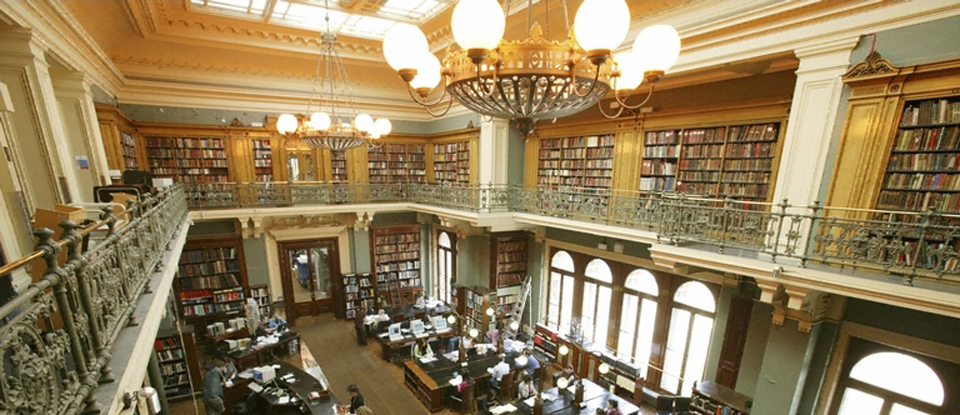
The National Art Library (c)V&A
This was one such event: on Monday 18th January I travelled down to the National Art Library in the V&A for an Arlis workshop. It was an all-day event, and I stayed for everything except the final tour of the National Art Library (getting back in time to pick up the little one from nursery would have been tricky had I stayed).

The library appeared pretty well appointed - they have numerous terminals for readers, with access to lots of online resources. In addition the shelves are full of materials, and there's more in the rolling stacks. They even have a seminar room, where we had a networking lunch - yes it was a little bit cold in the room, but at least they have one! I was very envious - and I think if I ever do go on a tour there, I'll only become more so. Nonetheless, I should try and arrange another visit sometime, in order to learn more about their work and where their collections can support ours.

The event itself consisted of several presentations from a range of libraries, and a hands-on task:

  • Enquiry work in an art and design museum (Bernadette Archer, NAL)
  • Enquiry work in an academic library (Cathy Johns, RCA)
  • Practical session on enquiry referral work: specialist sources (Yamuna Ravindran)
  • The future is paperless! (But the present still needs 3 x 5 cards...) (Joseph Ripp, NPG)
  • Finding connections - art, artist and audience (Jane Bramwell & Allison Foster, Tate)
The reasons for my wanting to attend were multiple.

1. To fill in the gaps in my knowledge and use of standard art resources 
I found Bernadette's talk particularly useful here. She talked about how the NAL deal with their enquiries, which are massively diverse. At the end she supplied a brief analysis of some of the resources they used. A lot I'd come across or use regularly, but there were a few resources I wasn't aware of which seem useful for the library here. The Guide to the Literature of Art History is one such - our reference collection is based both on the museum collections and the interests of the keepers who curate them. When a keeper is replaced, the new keeper will bring new and different specialisms to the museum, which may not be well catered for in the library, so this book is a great starting point to ensure that we have the fundamentals covered.
Success? Yes, lots of good information here, including where to go when I don't know the answers.

2. To ensure my current awareness is, well, both current and aware!
I think I didn't really learn about much here, which either means I'm sufficiently up to date, or that it wasn't really covered. There was again a lot of useful information in Bernadette's talk, with online resources that she uses, and their limits and strengths. EBSCO: ArtSource was recommended as being the most useful, but ProQuest and various other databases were mentioned too, the majority of which we have access to through the University Library.
Success? Yes, I think so. The UL keeps us well-covered for e-resources (although it doesn't subscribe to either AKL or Benezit online. Luckily, we have the hard copies).

3. To test out any resources before potentially purchasing them for my library
This was quite successful in one sense, in that during the hands-on session we made use of the many e-resources offered by the NAL. As museum staff had been asking for access to art valuation websites, I was particularly pleased to have a go with Art Price. However, buoyed up with the possibility of subscribing to this, I later found out that someone in the museum has a personal subscription and everyone gets him to do the searching, so "no need to waste the money". I must admit, I feel a bit flat when people find ways to avoid asking the library for things.
Success? On the day, absolutely. In the end, it turned out more irrelevant than I'd've liked. =(

4. To gain contacts in the area, particularly within museum libraries
I'm really not great at networking. I talked to a couple of people, including someone from The Goldsmiths' Company and a couple of university arts librarians. I thought it was interesting that speakers from museums tended to be people who worked with archives or collections that were considered special in their own right - I'm certainly not in that situation here, so it would be more helpful to make connections with other museum libraries more like mine, assuming there are any!
Success? Low to moderate. I need to be braver!

5. Finally, to raise the profile of my own library amongst those outside the university who might find it useful as a resource
Again, I wasn't great at promoting this library. One thing I hadn't realised was quite how extensive the National Art Library's holdings are when it comes to auction catalogues. They have a lot from overseas, whereas our collection only really focuses on UK, with sporadic German catalogues of antiquities, and the odd French, Chinese and Japanese catalogue from the bigger auction houses. However, I know for a fact we have items in our collection which fill gaps in theirs (and probably vice versa), so the sooner we get our volunteer cracking on the dealers' catalogues project, the better. After this, I am keen to investigate getting our records onto COPAC (currently the UL is there, but none of the other libraries in Cambridge, I believe). The library holds collections of items not readily available elsewhere in the country, so we could do a lot to support scholars from outside Cambridge if only they knew about it as a resource.
Success? Low. Getting our collections visible on the web will do more, I think.

On the whole, more successes than failures (and nothing was really a total failure). Definitely worth going on the course, and I'm very grateful to my line manager and the HR manager at work for supporting me and allowing library budget to be put towards this useful training.

Final Thoughts

Made it! So, in the end, what do I think? Image by Ralf Kunze from Pixabay I did this as a way of trying to stay connected with my l...